CASE STUDY · IBM MLZ
COMPANY
IBM
ROLE
UX Designer
TIMELINE
September – November 2025
TOOLS
Figma
Service Hosts within the configuration wizard

Service Hosts became part of MLz’s existing guided setup experience.
Overview
Machine Learning for IBM z/OS (MLz) brings machine learning capabilities to enterprise mainframe environments. Its Configuration Tool guides administrators through the initial setup of the product and its supporting infrastructure.
After designing the Service Hosts & Services management experience, I adapted those interactions for MLz’s existing setup wizard. I added steps that allowed administrators to create service hosts, associate services with them, and configure the resources required by each service type.
My role
As the UX Designer, I updated the configuration flow, designed the high-fidelity Service Hosts and Services interactions, and prepared specifications for development.
I also collaborated with content designer Kelly Xiang, continuing our work together from the earlier Service Hosts & Services management project.
Understanding the existing configuration experience
Before administrators could use Machine Learning for IBM z/OS, they needed to configure the product for their environment.
The Configuration Tool guided administrators through this process using an existing multistep wizard. It supported Core and Enterprise setup, covering foundational requirements such as authentication, core services, and runtime environments.
As MLz introduced new capabilities supported by Service Hosts and Services, the wizard needed to accommodate their additional setup requirements.
My task was to extend the existing configuration experience—not redesign it from scratch—so administrators could configure Service Hosts and Services as part of the initial setup process.
The challenge
The Service Hosts & Services management experience was designed for ongoing administration, where users could create and manage hosts and services as their needs changed.
Initial setup was different. These interactions needed to work within a fixed sequence, with administrators configuring service hosts before associating services with them.
Different service types also required different resource settings, including ports and hardware allocations.
The challenge was to account for these requirements while keeping the existing configuration process straightforward.
Rethinking the configuration flow
The earlier configuration flow handled ONNX and Trustworthy AI in separate sections.
I proposed replacing those sections with two new steps in both Core and Enterprise setup: Service Hosts, followed by Services.
This allowed administrators to configure their service hosts first, then associate services with those hosts in the following step.
I also worked with content designer Kelly Xiang to distinguish the existing Core services section from the new Services step, making it clearer which settings belonged to the product’s foundational configuration and which belonged to the additional services.
Original flow · Core left / Enterprise right

Updated proposal · Core left / Enterprise right

The proposed flow replaced separate ONNX and Trustworthy AI sections with Service Hosts and Services.
Integrating Service Hosts
At the Service Hosts step, administrators could enable configuration to add and manage hosts within the wizard.
Host configuration was optional, allowing administrators to skip this step if they didn’t need to configure hosts during initial setup.
Selecting Add service host opened a modal for entering the host’s name, type, network address, and system information.
Once added, hosts appeared in a table where administrators could review, edit, or delete them without leaving the wizard.
Empty host configuration state

Enabling host configuration revealed an empty table and an entry point for adding hosts.
Create service host · full modal
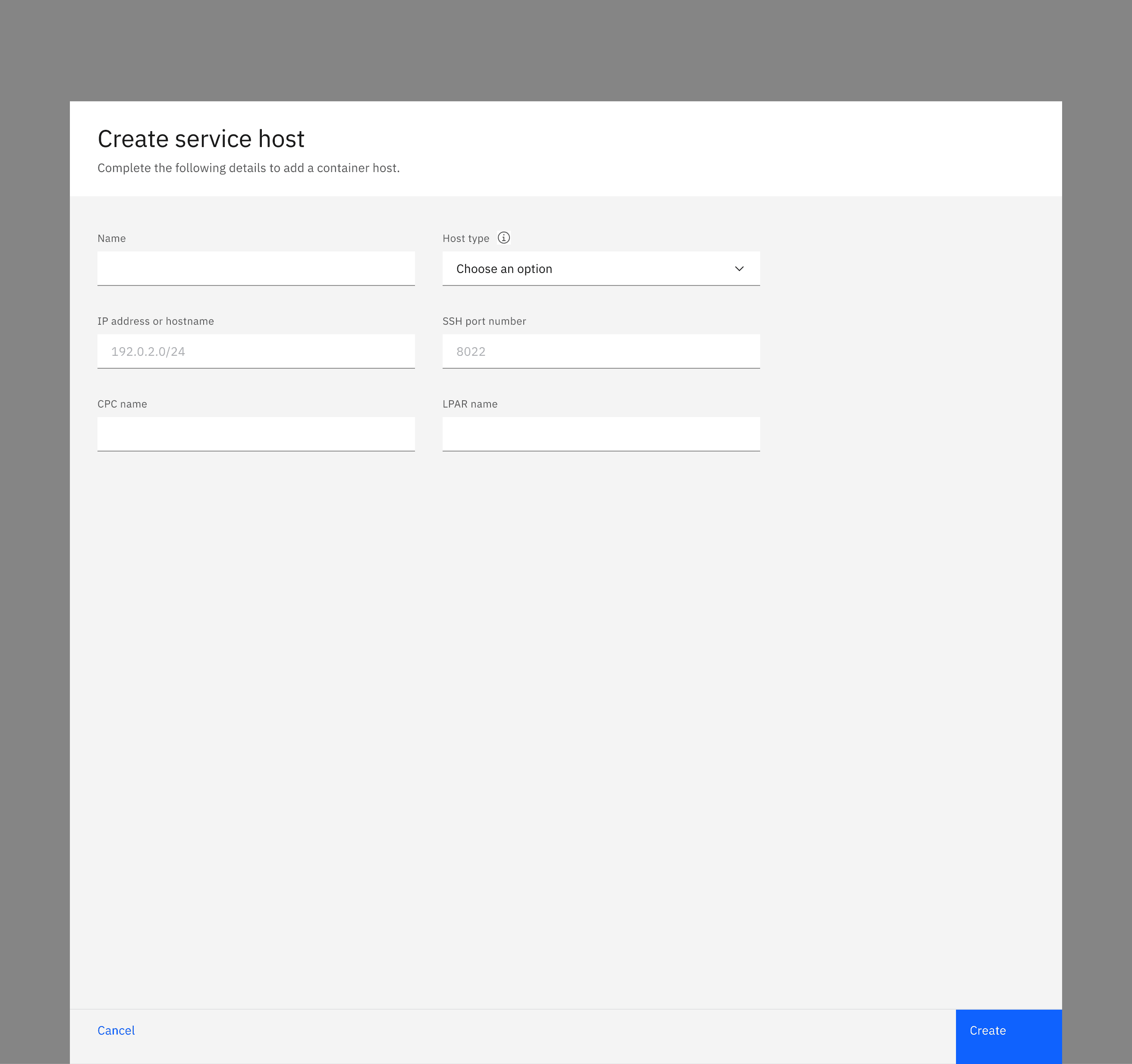
Selecting Add service host opened a modal for entering host details.
Populated host table · supporting detail

Added hosts appeared in the table with Edit and Delete actions.
Integrating Services
The Services step followed Service Hosts in the configuration wizard.
I adapted the service-management interactions so administrators could associate services with the hosts they had created during setup.
Selecting Create service opened a two-step modal: Service details and Service resources.
Administrators could select a service type, choose its associated hosts, and configure the required resources.
Services within the configuration wizard

The Services step followed Service Hosts.
Nested service creation

Create service opened a modal with Service details and Service resources steps.
Supporting different service requirements
The selected service type determined how administrators chose hosts and which resource settings they needed to configure.
Trustworthy AI and ONNX used single-host selection and a single port.
PCIe accelerator services supported multiple hosts, with separate port ranges and card allocations for each selected host.
Trustworthy AI · single-host selection
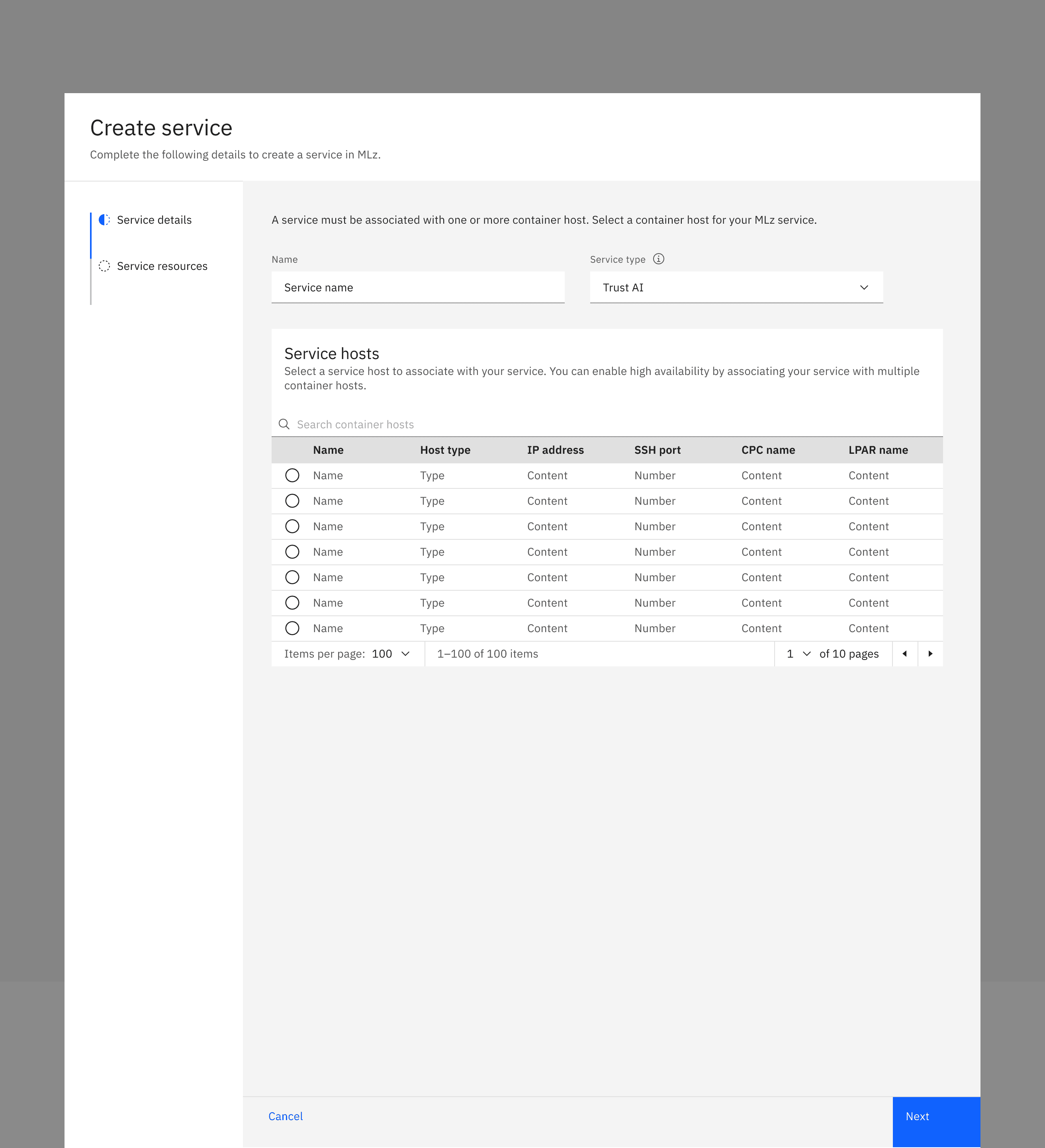
PCIe · multiple-host selection

Host selection adapted to each service type, from single-host selection to multi-host configuration.
These differences were reflected directly in the service-creation flow, so administrators only saw the options relevant to their selected service type.
Trustworthy AI / ONNX · single-port pattern

PCIe · host-specific resource allocation

Trustworthy AI and ONNX used a single port, while PCIe required port ranges and card allocations for each selected host.
Outcome
The expanded MLz Configuration Tool brings Service Hosts and Services into the existing setup wizard, allowing administrators to configure the infrastructure needed for AI services during initial setup.
Rather than introducing a separate configuration process, the design incorporates the new steps into the established flow while accounting for different host selection methods and resource requirements.
I completed the high-fidelity designs and specifications for development. The functionality was subsequently implemented and deployed to MLz’s testing environment.
Related project
Service Hosts & Services — The management experience that served as the foundation for this configuration work.